
How to change your App Store region
KekVPN may not be available in your App Store region.
View the steps
Change your App Store region
-
Open your account settings
Open the App Store and tap your profile picture at the top right. Then tap your name and email. Sign in if asked.
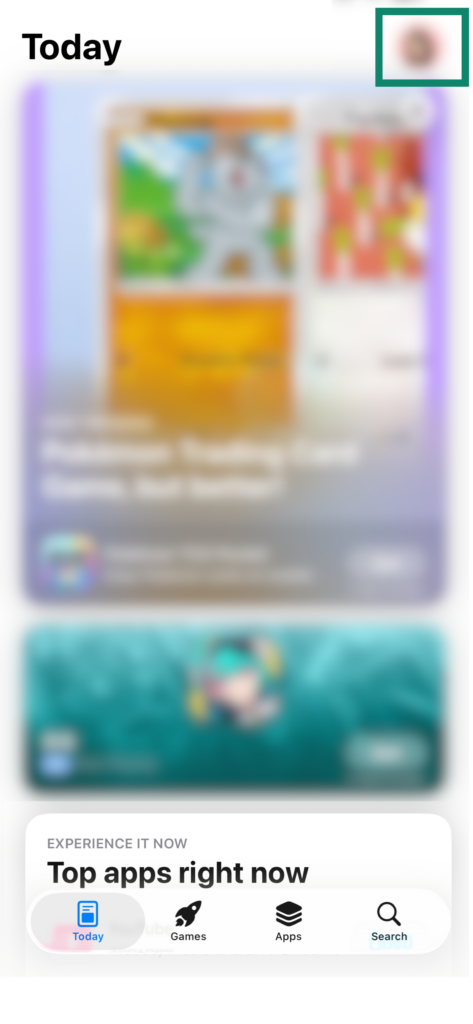
1. Tap your profile picture 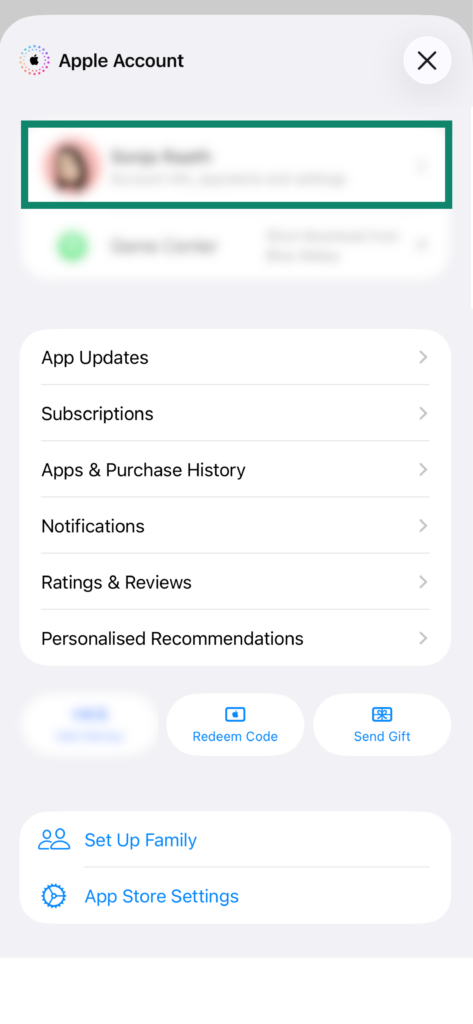
2. Open your account -
Choose Kazakhstan
Tap Country/Region, then Change Country or Region if shown. Select Kazakhstan from the list.
Tap Continue and accept Apple’s terms.
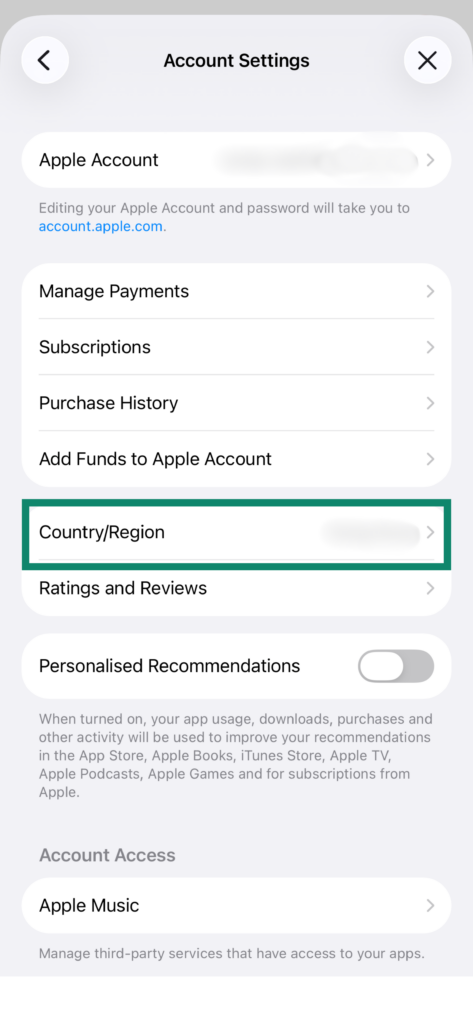
Country/Region -
Enter the payment details
Under Payment Method, select None. You do not need to enter a card when using this option.
Here is an example of the address fields for Kazakhstan:
- Street
- Astana
- City
- Astana
- Region
- Pavlodar
- Postcode
- 101000
- Phone
- 999 9999999
This is an address and phone format example. Use your own details for billing.
Tap Done.
-
Download KekVPN
Open the KekVPN App Store page using the button below, then tap Get or the cloud icon. If you already have the app, tap Update.
Open KekVPN in the App Store
Troubleshooting
Apple won’t let me change regions
Check what is preventing the change:
- Account credit. Spend the remaining balance. If it is less than the price of any item, contact Apple Support.
- Subscriptions. Cancel subscriptions that prevent a region change and wait for the paid period to end. Ask Apple Support if you are unsure.
- Family Sharing. Your family membership may prevent a change. Before leaving, check how shared purchases and subscriptions will be affected.
- Pending transactions. Wait for refunds, pre-orders and other purchases to complete.
Apple asks for a card and there is no None option
Try the United States instead of Kazakhstan: return to Country/Region, select United States and check whether None is available as a payment method. KekVPN is also available in the US App Store.
You will need a US address; the Kazakhstan example above does not apply. The None option depends on your account. If Apple still asks for a card, contact us.
What happens to iCloud, photos and subscriptions?
This guide does not require signing out of iCloud or deleting data from your device.
Changing regions can affect the availability of purchases and Apple services, payment methods and prices. Some subscriptions may need to end first. Check any important subscriptions before switching.
If KekVPN does not show your subscription after an update, contact support before buying it again.
I changed regions, but KekVPN is still unavailable
Close and reopen the App Store, then use the KekVPN link. Check that your new country is shown in Media & Purchases.
If that does not help, send us the error message or a screenshot. Keep your existing app installed.